There are four main database objects that contain stored SQL: VIEWS, TRIGGERS, FUNCTIONS and STORED PROCEDURES. Yesterday, I created a pattern searching tool for TRIGGERS. Today, I am going to clone and modify the code so that it will work with FUNCTIONS.
Again, I want to examine the dynamic SELECT statement that retrieves the user defined stored procedure names from a given database. This is the key element of the whole program.
I took the liberty to modify the original code so that it will work standalone. The current code returns the schema name, the object name, and a combination of both called full name. The full name is used by the system stored procedure called sp_helptext that returns the stored SQL code (text) for any object.
Both the sys.objects and sys.schemas system views are local to a given database. Therefore, the TSQL has to be dynamic since we do not know the database name ahead of time.
|
1 2 3 4 5 6 7 8 9 10 11 12 13 |
-- DECLARE LOCAL VARIABLES DECLARE @VAR_DATABASE_NM VARCHAR(256) = 'AdventureWorks2008R2'; DECLARE @VAR_TSQL VARCHAR(2048) = ''; -- DYNAMIC SQL SINCE DB IS NOT SAME ALL THE TIME SELECT @VAR_TSQL = ' SELECT S.NAME + ''.'' + O.name AS FULL_NM, ' + ' S.NAME AS SCHEMA_NM, ' + ' O.NAME AS OBJECT_NM ' + ' FROM ' + @VAR_DATABASE_NM + '.sys.objects AS o (NOLOCK) INNER JOIN ' + @VAR_DATABASE_NM + '.sys.schemas AS s (NOLOCK) ON o.schema_id = s.schema_id ' + ' WHERE [TYPE] = ''P'' AND is_ms_shipped = 0' EXEC (@VAR_TSQL); |
The WHERE clause has an expression that filters in the correct object type. I will substitute ‘P’ with (‘FN’ , ‘IF’, ‘TF’) for this code to search for FUNCTIONS. Please refer to books on line for object type in sys.objects. Both the global and local temporary table names are changed to reflect FUNCTIONS in our new procedure named [usp_get_text4fn].
Enclosed is the full stored procedure for your usage.
A sample call to the tool to list and save all function code in the AdventureWorks database to a user defined table.
|
1 2 |
-- Save info to temporary table EXEC MSDB.[dbo].[usp_get_text4fn] 'AdventureWorks2008R2' |
We can filter by object name if it is known. I am looking for the user defined function called GetContactInformation.
|
1 2 3 |
-- Look for a object SELECT * FROM [tempdb].[dbo].[sso_a1017012_text4fn] WHERE object_nm = 'ufnGetContactInformation' |
We can filter by actual code if we know a key value. I am looking for any tables that have the word Inventory.
|
1 2 3 |
-- Look for a pattern SELECT * FROM [tempdb].[dbo].[sso_a1017012_text4fn] WHERE sql_txt LIKE '%Inventory%' |
The image below show the results of this search. The first record matches a table that we were looking for. Unfortunately, the second match is only comments and is not important for our current research.
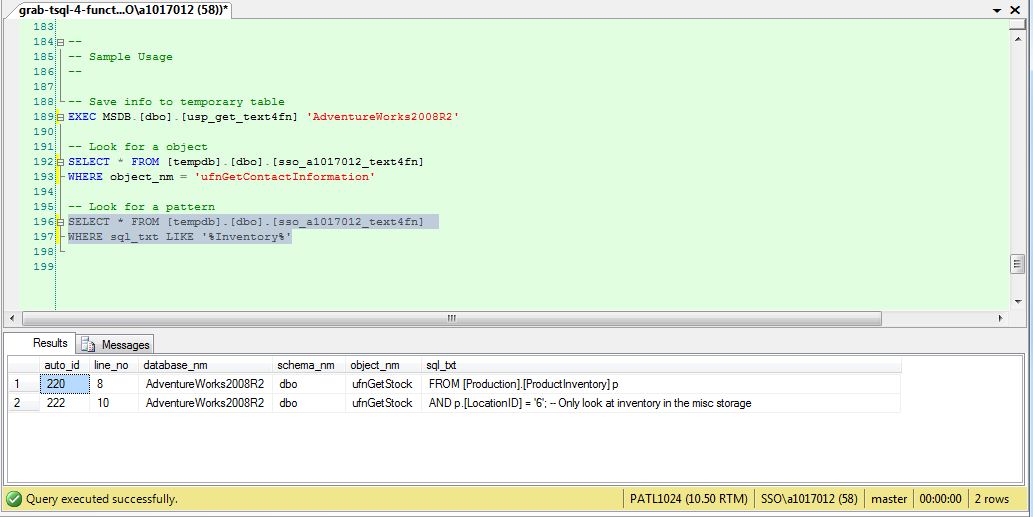
Again, the user defined table created by this procedure stays in the system until tempdb is recreated upon server startup. Next time, I will show how this query needs to be adjusted to display SQL code for VIEWS.



Thanks for that. Very informative material. I’ve tried looking for this kind of information for a long time and its hard to do that with thousands if not millions of searches on Google. But with luck, I stumbled upon this page. I appreciate the information you’ve put into this.
Merely a smiling visitant here to share the love (:, btw great layout.
I greatly like this article! If it’s not too much trouble post more articles.