Today, I am going to start building on some the articles I did in the past. We are going to create tools to pattern search stored SQL statements. Four main objects that contain stored SQL are VIEWS, TRIGGERS, FUNCTIONS and STORED PROCEDURES.
Recently at work, I was asked to find all SQL code that had a certain business rule. The task is to return all objects that reference to a certain temperature process named T1. One solution to this problem is to buy a tool like SQL Search from Red Gate. But this tool does not list the actual line number in the code that a pattern was found. Also, advanced search logic like “find all stored procedures that have a variable named T1 and initials of JFM, the SQL developer on the project” can not be performed.
Given this dilemma, I decided to write a tool, a user defined stored procedure, to do just want I wanted. There is a nice system stored procedure called sp_helptext that returns the stored SQL code (text) for any object. Today, I am going to write a tool for use with stored procedures.
The next step in the process is to write down psuedo code for the algorithm I wanted.
1 – Ask the user for a database name.
2 – Create a global temp table in tempdb to store results.
3 – Dump details of the objects into a local temp table.
4 – Add information like database name, schema name, object name and line numbers.
The header section of the CREATE PROCEDURE defines any parameters that are passed as input. I am going to ask the user for a valid database name and a optional verbose indicator.
|
1 2 3 4 5 6 7 8 9 10 |
-- -- Create the new stored procedure -- CREATE PROCEDURE [dbo].[usp_get_text4sp] @VAR_DATABASE_NM VARCHAR(256) = '*', @VAR_VERBOSE_IND TINYINT = 1 AS BEGIN |
Here are the TRANSACTIONAL SQL statements I am going to use for Step 1.
IF – statement allows for conditional execution of code.
BEGIN & END – statements mark the start and stop of a code block.
PRINT – statement returns messages to the output window in SSMS.
RETURN – statement exits the stored procedure immediately.
The first task in step 1 of the algorithm is to make sure that the name of the database is valid. I first test the variable to make sure that it is not equal to the default value of ‘*’. If it is the default, the user did not pass a value.
The second task in step 1 of the algorithm is to make sure the name is valid. This is done by check the system view sys.databases for the supplied name.
|
1 2 3 4 5 6 7 8 9 10 11 12 13 14 15 16 17 18 19 |
-- -- Check input parameters -- -- No Input IF (@VAR_DATABASE_NM = '*') BEGIN PRINT '[usp_get_text4sp] - please select a valid database name to get TSQL from.' PRINT ' ' RETURN END -- Bad Input IF NOT EXISTS (SELECT 1 FROM sys.databases AS d (NOLOCK) WHERE d.name = @VAR_DATABASE_NM and d.state_desc = 'ONLINE') BEGIN PRINT '[usp_get_text4sp] - please select a valid database name to get TSQL from. Database (' + @VAR_DATABASE_NM + ') is invalid.' PRINT ' ' RETURN END |
The Step 2 of the algorithm is where a global temp table is defined in tempdb. I want the tool to be able to have more than one user at a time. Therefore, we need to dynamically create a table named after the user and the object (s)he is looking for. Please note, the table will exist in tempdb until the server is restarted.
Here are the TRANSACTIONAL SQL statements I am going to use for Step 2.
SUSER_ID() – function returns the current user id.
SUSER_NAME() – function converts the id into a textual windows domain and login user.
REPLACE() – function switches all occurences of the search string with a new string.
ISNULL() – function uses value one if it is not null, else it uses value two.
DECLARE – statement is used to declare local variables.
SET – statement is used to perform assignment with variables.
EXISTS() – function determines if a result set is not empty.
EXECUTE() – statement runs dynamic SQL.
Step 2 can be broken down into two sub-tasks. If the table exists, (TRUNCATE TABLE) clear the data. If the table does not exist, create the table from scratch (CREATE TABLE). Both tasks use dynamic SQL.
|
1 2 3 4 5 6 7 8 9 10 11 12 13 14 15 16 17 18 19 20 21 22 23 24 25 26 27 28 29 30 31 32 33 34 |
-- -- Prepare temp table for user -- -- NO COUNTING SET NOCOUNT ON; -- DECLARE LOCAL VARIABLES FOR STEP 1 DECLARE @VAR_TABLE_NM VARCHAR(256); DECLARE @VAR_TSQL VARCHAR(2048); -- GET USER NAME FOR TEMP TABLE SET @VAR_TABLE_NM = LOWER('[TEMPDB].[DBO].[' + ISNULL(REPLACE(SUSER_SNAME(SUSER_SID()), '\', '_'), 'DEFAULT2') + '_text4sp]'); -- TRUNCATE OR CREATE TABLE? TABLE IS TEMPORARY TO SERVER. IF EXISTS (SELECT * FROM TEMPDB.sys.objects AS T1 (NOLOCK) WHERE T1.object_id = OBJECT_ID(@VAR_TABLE_NM) AND type in (N'U')) BEGIN SET @VAR_TSQL = 'TRUNCATE TABLE ' + @VAR_TABLE_NM; EXECUTE (@VAR_TSQL); END ELSE BEGIN SET @VAR_TSQL = 'CREATE TABLE ' + @VAR_TABLE_NM + ' (' + ' [auto_id] int identity(1, 1) not null ' + ' , [line_no] int null ' + ' , [database_nm] sysname null ' + ' , [schema_nm] sysname null ' + ' , [object_nm] sysname null ' + ' , [sql_txt] text null ' + ' ); '; EXECUTE (@VAR_TSQL); END |
Step 3 of the algorithm is where a local temporary table is create to store the fully qualified name of user defined objects for a given database.
Step 4 of the algorithm is where a cursor is DECLARED, OPENED, FETCHED NEXT, CLOSED and DEALLOCATED.
Cursors are a great object for traversing over a small result set for administrative purposes.
A infinite WHILE loop is used to process the records until the @@FETCH_STATUS variable is non-zero. A non-zero condition indicates that there is no more data. The BREAK statement is used to exit the loop at that point.
Step 4 can be broken down into two sub-tasks which process each record in the temporary table created in step 3. For each record, add the output of the sp_helptext system stored procedure to the user specific, global temp table in tempdb. Update the output for the current record to reflect database name, schema name, object name and line numbers.
|
1 2 3 4 5 6 7 8 9 10 11 12 13 14 15 16 17 18 19 20 21 22 23 24 25 26 27 28 29 30 31 32 33 34 35 36 37 38 39 40 41 42 43 44 45 46 47 48 49 50 51 52 53 54 55 56 57 58 59 60 61 62 63 64 65 66 67 68 69 70 71 72 73 74 75 |
-- -- Load temp table with data -- -- DECLARE LOCAL VARIABLES FOR STEP 2 DECLARE @VAR_FULL_NM AS SYSNAME; DECLARE @VAR_OBJECT_NM AS SYSNAME; DECLARE @VAR_SCHEMA_NM AS SYSNAME; -- TABLE TEMPORARY TO PROCESS (SPID) CREATE TABLE #TEXT4SP ( FULL_NM sysname, SCHEMA_NM sysname, OBJECT_NM sysname ); -- DYNAMIC SQL SINCE DB IS NOT SAME ALL THE TIME SELECT @VAR_TSQL = ' INSERT INTO #TEXT4SP ' + ' SELECT S.NAME + ''.'' + O.name AS FULL_NM, ' + ' S.NAME AS SCHEMA_NM, ' + ' O.NAME AS OBJECT_NM ' + ' FROM ' + @VAR_DATABASE_NM + '.sys.objects AS o (NOLOCK) INNER JOIN ' + @VAR_DATABASE_NM + '.sys.schemas AS s (NOLOCK) ON o.schema_id = s.schema_id ' + ' WHERE [TYPE] = ''P'' AND is_ms_shipped = 0' EXEC (@VAR_TSQL); -- USE CURSOR TO PROCESS THE RESULTS DECLARE CUR_OBJS CURSOR FOR SELECT FULL_NM, SCHEMA_NM, OBJECT_NM FROM #TEXT4SP ORDER BY FULL_NM -- OPEN THE CURSOR OPEN CUR_OBJS; -- EXAMINE EACH OBJECT AND GET DETAILED INFO WHILE (1=1) BEGIN -- GRAB A ROW OF INFORMATION FETCH NEXT FROM CUR_OBJS INTO @VAR_FULL_NM, @VAR_SCHEMA_NM, @VAR_OBJECT_NM; -- CHECK FOR PROCESSING ERRORS IF (@@FETCH_STATUS < 0) BREAK; -- MAKE UP THE SQL STMT & EXECUTE SELECT @VAR_TSQL = 'use [' + @VAR_DATABASE_NM + ']; insert into ' + @VAR_TABLE_NM + '(sql_txt) exec sp_helptext @objname = N''' + @VAR_FULL_NM + ''''; EXEC (@VAR_TSQL); -- UPDATE TO THE CORRECT DATABASE, SCHEMA & OBJECT NAME AS WELL AS LINE NUMBER SELECT @VAR_TSQL = 'update ' + @VAR_TABLE_NM + ' set database_nm = ''' + @VAR_DATABASE_NM + ''', schema_nm = ''' + @VAR_SCHEMA_NM + ''', object_nm = ''' + @VAR_OBJECT_NM + ''', line_no = auto_id + 1 - (select min(auto_id) from ' + @VAR_TABLE_NM + ' where schema_nm is null) ' + ' where schema_nm is null;'; EXEC (@VAR_TSQL) END -- CLOSE THE CURSOR CLOSE CUR_OBJS; -- RELEASE THE CURSOR DEALLOCATE CUR_OBJS; |
The last part of the stored procedure is to tell the user where to find the output table in tempdb. This is done by using the PRINT statement to echo the name of the results table.
|
1 2 3 4 5 6 7 8 9 |
-- CHECK TEMP TABLE FOR RESULTS, MESSAGE ON IF VERBOSE IF (@VAR_VERBOSE_IND = 1) BEGIN PRINT '[usp_get_text4sp] - please select from table ' + @VAR_TABLE_NM + ' for your output.' PRINT ' ' END END GO |
Enclosed is the full stored procedure for your usage.
A sample call to the tool to list and save all stored procedure code in the AdventureWorks database to a user defined table.
|
1 2 |
-- Save info to temporary table EXEC MSDB.[dbo].[usp_get_text4sp] 'AdventureWorks2008R2' |
We can filter by object name if it is known. I am looking for the update employee hire info.
|
1 2 3 |
-- Look for a object SELECT * FROM [tempdb].[dbo].[sso_a1017012_text4sp] WHERE object_nm = 'uspUpdateEmployeeHireInfo' |
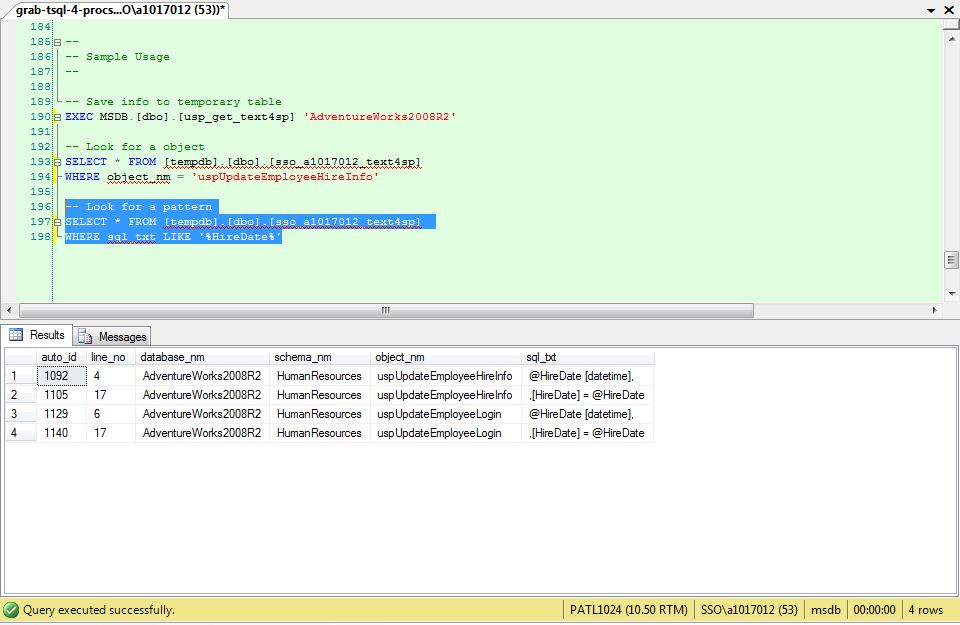
We can filter by actual code if we know a key value. I am looking for the hire date.
|
1 2 3 |
-- Look for a pattern SELECT * FROM [tempdb].[dbo].[sso_a1017012_text4sp] WHERE sql_txt LIKE '%HireDate%' |
The image below show the results of this search.
Again, the user defined table created by this procedure stays in the system until tempdb is recreated upon server startup.
The system views named sys.objects and sys.schemas are key concepts in this solution. In upcoming articles, I will explain how this query needs to be adjusted for the four different objects that have stored SQL.



Saved as a favorite, I love your blog! :)
Well, this really is my very first visit to your site! We are a gaggle of volunteers and starting a new effort in a neighborhood in the very same niche. Your website provided us all valuable information to work in. You have done any marvellous work!
Rattling nice pattern and excellent content material, absolutely nothing else we want :D.
I am unable to thank you more than enough for the posts on your website. I know you place a lot of time and energy into these and hope you know how considerably I enjoy it.